1. Unequal ECMP for EVPN IP prefix routes#
| Short Description | Enable Unequal ECMP for anycast BGP PE-CE routes |
| Estimated Time | 60 minutes |
| Topology Nodes | client1, client3, client4, client5, leaf1, leaf3, borderleaf1, borderleaf2 |
| References | SR Linux documentation |
1.1 Objective#
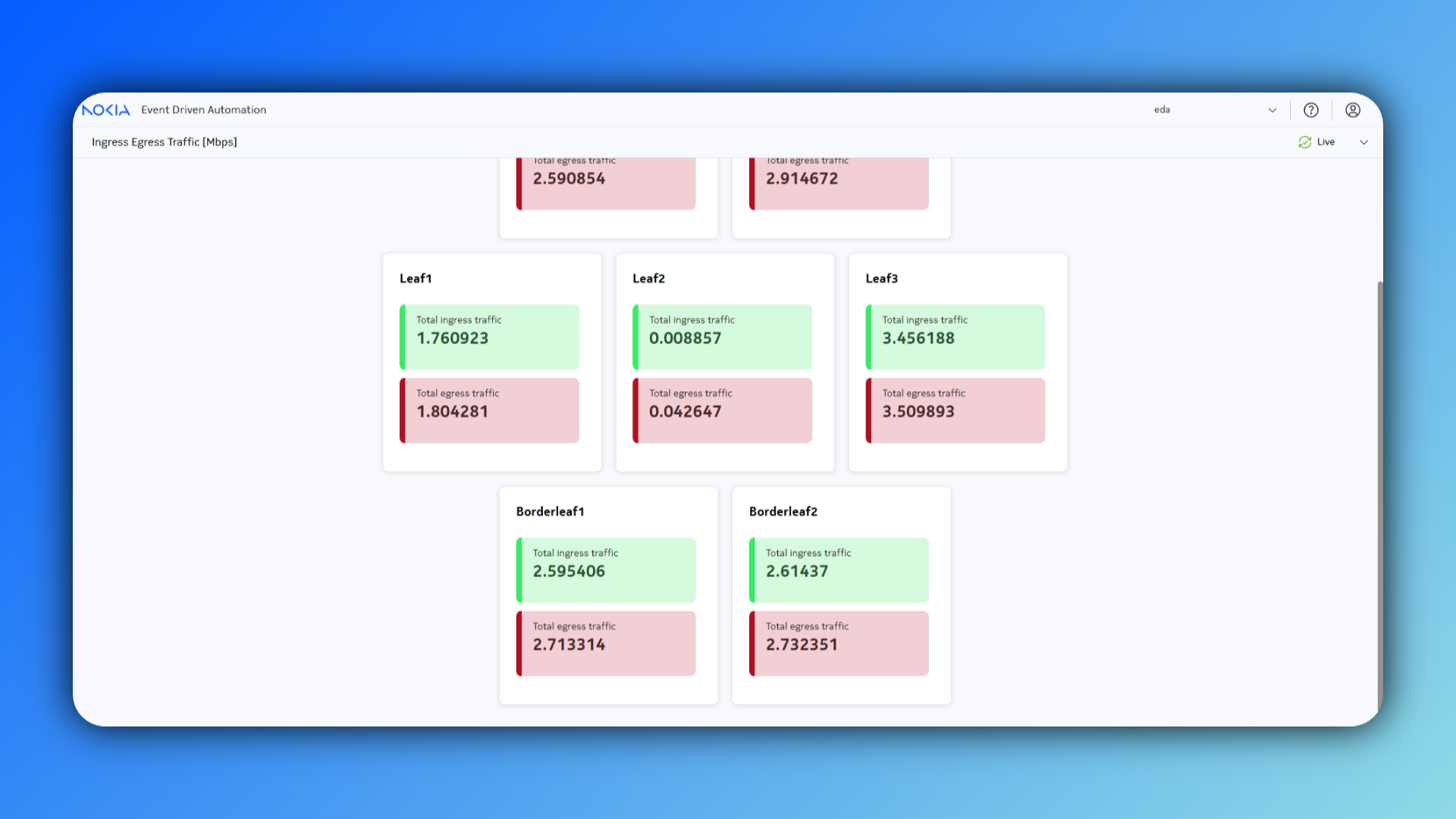
In this activity, clients advertise the 1.1.1.0/24 anycast subnet to the DC fabric via BGP. Leaf1 has one path to the client, while Leaf3 has two. Standard ECMP splits traffic evenly between the leafs (50/50), causing uneven utilization of the edge links. To resolve this, enabling EVPN with weighted ECMP forces the border leafs to distribute traffic proportionally to the number of active paths (1:2). This ensures perfectly equal load-balancing across all edge interfaces, rather than equal balancing across VTEPs.
1.2 Technology explanation#
1.2.1 Weighted ECMP for EVPN IP prefix routes#
Overview
SR Linux supports Weighted ECMP for EVPN-VXLAN and EVPN-MPLS services using the Interface-Less (IFL) model. This feature utilizes the EVPN Link-Bandwidth Extended Community (defined in draft-ietf-bess-evpn-unequal-lb) to signal the bandwidth capacity of a path based on the number of active downstream next-hops.
Mechanism
- Signaling: Leaf routers calculate the number of active PE-CE paths (next-hops) for a specific IP prefix.
- Advertisement: The leaf re-advertises the prefix into the EVPN domain, attaching an EVPN Link-Bandwidth Extended Community where the Weight value equals the count of local PE-CE paths.
- Forwarding (Border Leaf/DC GW): Upon receiving multiple routes for the same prefix, the ingress PE installs the routes with their respective weights. If the Ethernet Segment Identifier (ESI) is 0, traffic is sprayed proportionally to the advertised weights rather than evenly across the VTEPs.
Scenario: Anycast Subnet 1.1.1.0/24
- Leaf1: Has 1 PE-CE path Advertises EVPN route with Weight: 1.
- Leaf3: Has 2 PE-CE paths Advertises EVPN route with Weight: 2.
Traffic Distribution Result
Instead of a standard 50/50 split between Leaf1 and Leaf3, the Border Leaf calculates the total weight (1 + 2 = 3) and distributes flows as follows: - 33% (1/3) of flows sent to Leaf1. - 67% (2/3) of flows sent to Leaf3.
This ensures the traffic load on the edge links remains balanced, preventing congestion on the single link connected to Leaf1.
1.2.2 Service creation using EDA#
EDA provides a dedicated abstraction for the creation of combined layer-2 and layer-3 services: the VNVirtual Networks resource. Off course you can also create L2 and L3 services separately, using the BDBridge Domains and RRouters resources respectively. More information on this can be found in the References sections. In this activity, we will use the Virtual Networks resource.
A Virtual Network combines multiple bridge domains, routers, routed interfaces and protocols in a single resource. A typical Virtual Network might for example contain:
- A bridge domain for storage computes
- A bridge domain for GPU clusters
- A bridge domain for in-band management access to all computes
- Redundant routed interfaces, each towards a datacenter gateway (DCGW)
- BGP sessions with the DCGWs, so the internal routes can be advertised to the Wide-Area Network (WAN) and external routes can be imported to provide internet connectivity
The diagram below depicts how a single high-level Virtual Network resource emits multiple sub-resources and through this orchestrates a creation of a composite service topology.
graph TB
    X["Virtual Network"]-->A["Router"]
    A-->B["Bridge Domain A"]
    A-->C["Bridge Domain B"]
    A-->D["Routed Interface 1"]
    A-->E["Routed Interface 2"]
    B-->F["VLAN 300"]
    C-->G["VLAN 311"]
More details about service creation using EDA can be found in activities Bridge Domains, Routers and Virtual Networks in the References section.
In this exercise, we'll create a L3 EVPN service with routed interfaces towards clients 1, 3, 4 and 5. Over these interfaces, we will also run eBGP sessions. The diagram below depicts what your Virtual Network resource will create.
graph TB
    X["Virtual Network"]-->A["Router"]
    A-->B["Routed Interface 1 - 5"]
    A-->C["BGP Group CNF"]
    A-->D["BGP Group PE-CE"]
    A-->E["BGP Peer 1 - 5"]
1.3 Tasks#
1.3.1 Create the Virtual Network with BGP PE-CE edge connectivity#
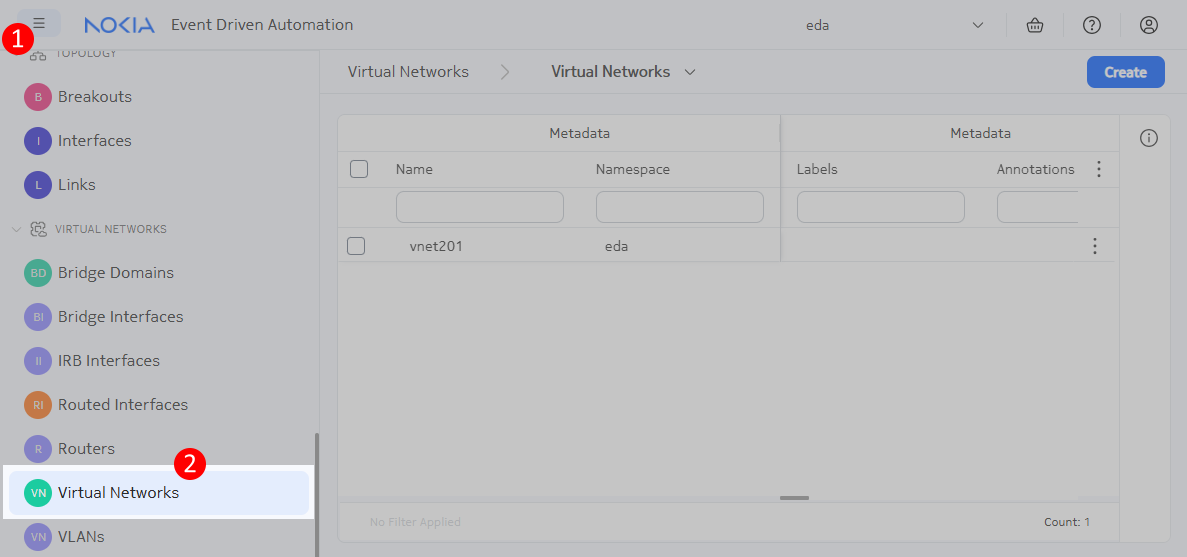
Before enabling weighted ECMP, we will deploy the service used for this use-case. Deploy the Unequal ECMP service architecture using the VNVirtual Networks resource.
In a single virtual network resource you will be able to define:
- a Router to create the IP-VRF of the EVPNVXLAN type
- five Routed Interfaces to connect the Router to the
client1,client3,client4andclient5over the VLAN 400 - two BGP Groups where you specify the used
Routing Policies, address families and AS numbers - five BGP Peers that reference a
Routed Interface, inherit properties from aBGP Group, and where you define the peer IP address
Note
Hosts client1, client3 and client4 are running BGP with ASN 65554. Host client5 is running BGP with ASN 65556.
Hint
In this lab environment, for simplicity, we can use the accept-all routing policy.
Solution
apiVersion: services.eda.nokia.com/v1
kind: VirtualNetwork
metadata:
  name: vrf1
  namespace: eda
spec:
  protocols:
    bgp:
      bgpGroups:
        - name: bgp-group-cnf
          spec:
            exportPolicy:
              - accept-all
            importPolicy:
              - accept-all
            ipv4Unicast:
              enabled: true
            localAS:
              autonomousSystem: 65555
            peerAS:
              autonomousSystem: 65554
        - name: bgp-group-pe
          spec:
            exportPolicy:
              - accept-all
            importPolicy:
              - accept-all
            ipv4Unicast:
              enabled: true
            localAS:
              autonomousSystem: 65555
            peerAS:
              autonomousSystem: 65556
      bgpPeers:
        - name: cnf1
          spec:
            dynamicNeighbor: false
            group: bgp-group-cnf
            interface: vrf1-routed-interface-client1
            interfaceKind: ROUTEDINTERFACE
            peerIP: 10.40.1.1
        - name: cnf3
          spec:
            dynamicNeighbor: false
            group: bgp-group-cnf
            interface: vrf1-routed-interface-client3
            interfaceKind: ROUTEDINTERFACE
            peerIP: 10.40.3.1
        - name: cnf4
          spec:
            dynamicNeighbor: false
            group: bgp-group-cnf
            interface: vrf1-routed-interface-client4
            interfaceKind: ROUTEDINTERFACE
            peerIP: 10.40.4.1
        - name: pe5-1
          spec:
            dynamicNeighbor: false
            group: bgp-group-pe
            interface: vrf1-routed-interface-bleaf1-client5
            interfaceKind: ROUTEDINTERFACE
            peerIP: 20.40.1.1
        - name: pe5-2
          spec:
            dynamicNeighbor: false
            group: bgp-group-pe
            interface: vrf1-routed-interface-bleaf2-client5
            interfaceKind: ROUTEDINTERFACE
            peerIP: 20.40.2.1
  routedInterfaces:
    - name: vrf1-routed-interface-client1
      spec:
        arpTimeout: 14400
        interface: leaf1-client1
        ipMTU: 1500
        ipv4Addresses:
          - ipPrefix: 10.40.1.0/31
        learnUnsolicited: NONE
        router: router-vrf1
        vlanID: '400'
        vlanPool: vlan-pool
    - name: vrf1-routed-interface-client3
      spec:
        arpTimeout: 14400
        interface: leaf3-client3
        ipMTU: 1500
        ipv4Addresses:
          - ipPrefix: 10.40.3.0/31
        learnUnsolicited: NONE
        router: router-vrf1
        vlanID: '400'
        vlanPool: vlan-pool
    - name: vrf1-routed-interface-client4
      spec:
        arpTimeout: 14400
        interface: leaf3-client4
        ipMTU: 1500
        ipv4Addresses:
          - ipPrefix: 10.40.4.0/31
        learnUnsolicited: NONE
        router: router-vrf1
        vlanID: '400'
        vlanPool: vlan-pool
    - name: vrf1-routed-interface-bleaf1-client5
      spec:
        arpTimeout: 14400
        interface: borderleaf1-client5
        ipMTU: 1500
        ipv4Addresses:
          - ipPrefix: 20.40.1.0/31
        learnUnsolicited: NONE
        router: router-vrf1
        vlanID: '400'
        vlanPool: vlan-pool
    - name: vrf1-routed-interface-bleaf2-client5
      spec:
        arpTimeout: 14400
        interface: borderleaf2-client5
        ipMTU: 1500
        ipv4Addresses:
          - ipPrefix: 20.40.2.0/31
        learnUnsolicited: NONE
        router: router-vrf1
        vlanID: '400'
        vlanPool: vlan-pool
  routers:
    - name: router-vrf1
      spec:
        bgp:
          autonomousSystem: 65555
          ebgpPreference: 170
          enabled: true
          ibgpPreference: 170
          ipv4Unicast:
            enabled: true
            multipath:
              allowMultipleAS: true
              maxAllowedPaths: 64
          minWaitToAdvertise: 0
          rapidWithdrawl: true
          waitForFIBInstall: false
        eviPool: evi-pool
        tunnelIndexPool: tunnel-index-pool
        type: EVPNVXLAN
        vniPool: vni-pool
1.3.2 Validate ECMP traffic load-balancing#
You can run traffic between client5 and the anycast service advertised by the CNFs using the script clab/configs/client/run-traffic.sh. This scripts takes the input of amount of seconds to run the traffic. This script will run 100 different iperf flows of 50kbps across the fabric to the 1.1.1.0/24 subnet.
$ bash clab/configs/client/run-traffic.sh 120
client1: 7d4e2829e2fc
client3: cfc6f672bb4d
client4: 15ab2fd79ff7
client5: 811ead78f872
iperf server already running in container 7d4e2829e2fc
iperf server already running in container cfc6f672bb4d
iperf server already running in container 15ab2fd79ff7
Starting iperf flows from client5...
# clipped
1.3.2.1 Grafana Dashboard#
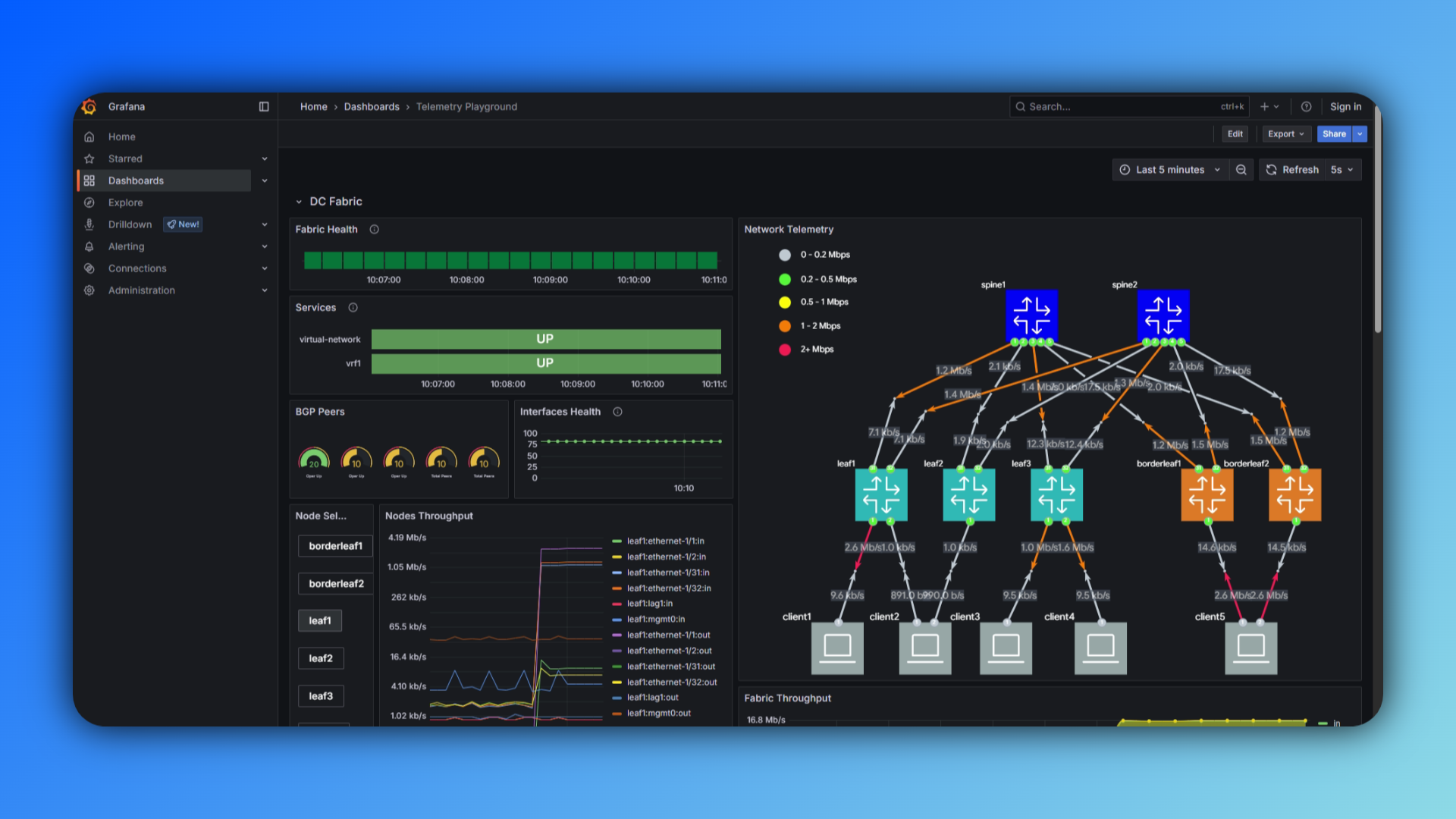
Navigate to https://{your-ip}:9443/core/httpproxy/v1/grafana/dashboard to see the live traffic distribution accross the fabric.
1.3.2.2 Custom EDA Dashboard#
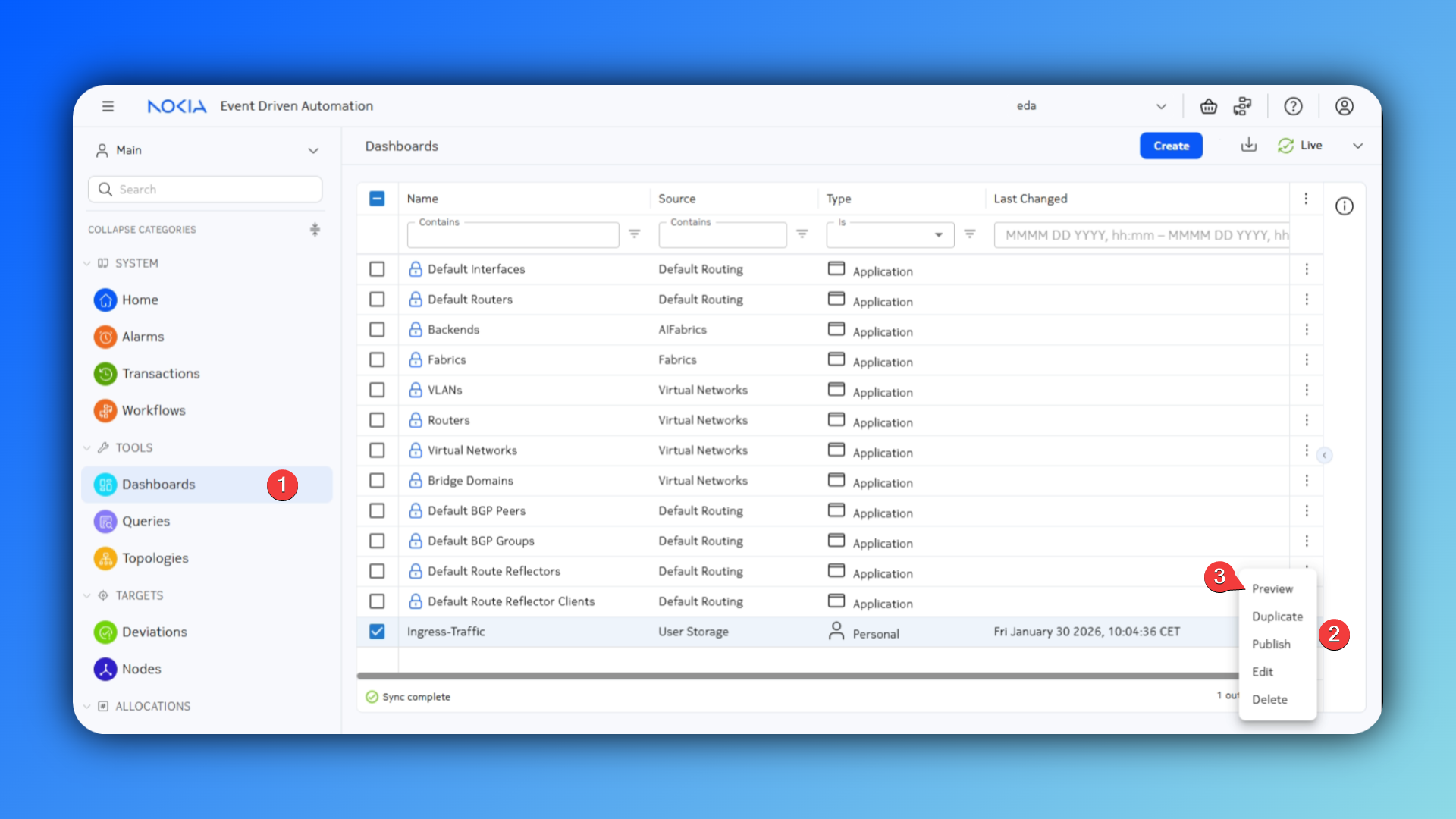
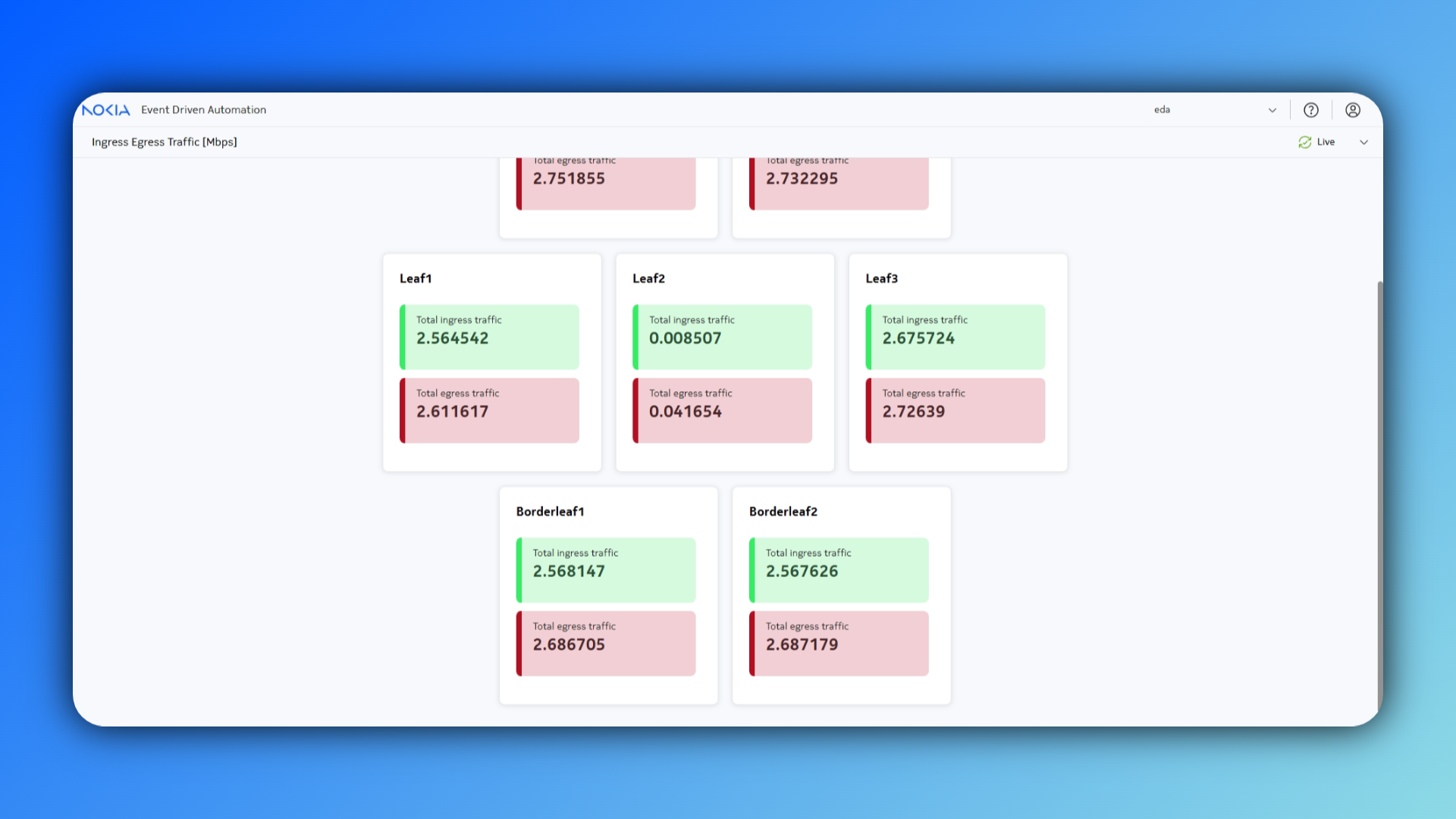
In EDA, you can also build custom dashboards. This allows you to create visualizations of your network's state information for specific use-cases. In this case, we are interested in the ingress traffic distribution between the different leaf nodes. We've prepared such a dashboard for you, it can be found at Dashboards
1.3.3 Enable Unequal ECMP for EVPN IP prefix routes#
From the SR Linux documentation, we can see that we require some configuration in the BGP Peer context and the bgp-evpn context, to enable weighted EVPN ECMP for PE-CE BGP routes.
To achieve this we need to configure the following on leaf1 and leaf3:
- Enable advertisements of the EVPN link bandwidth extended community:
- Configure a weight to be internally added to the received PE-CE BGP routes:
Similarly, we need to enable weighted ECMP on the borderleafs. When weighted ECMP is enabled, the system takes into account the EVPN link-bandwidth extended community when installing an ECMP set for an EVPN IP prefix route in the IP-VRF route table.
network-instance router-vrf1 {
    protocols {
        bgp-evpn {
            bgp-instance 1 {
                routes {
                    route-table {
                        ip-prefix {
                            evpn-link-bandwidth {
                                weighted-ecmp {
                                    admin-state enable
                                    max-ecmp-hash-buckets-per-next-hop-group 4
                                }
                            }
                        }
                    }
                }
            }
        }
    }
}
Off course, we will not log into every single node and configure this manually. With EDA, you can use Configlets to configure anything that is not covered by intents.
Translate these config snippets into EDA Configlets to easily deploy this configuration on multiple nodes. To achiieve this, the steps involve:
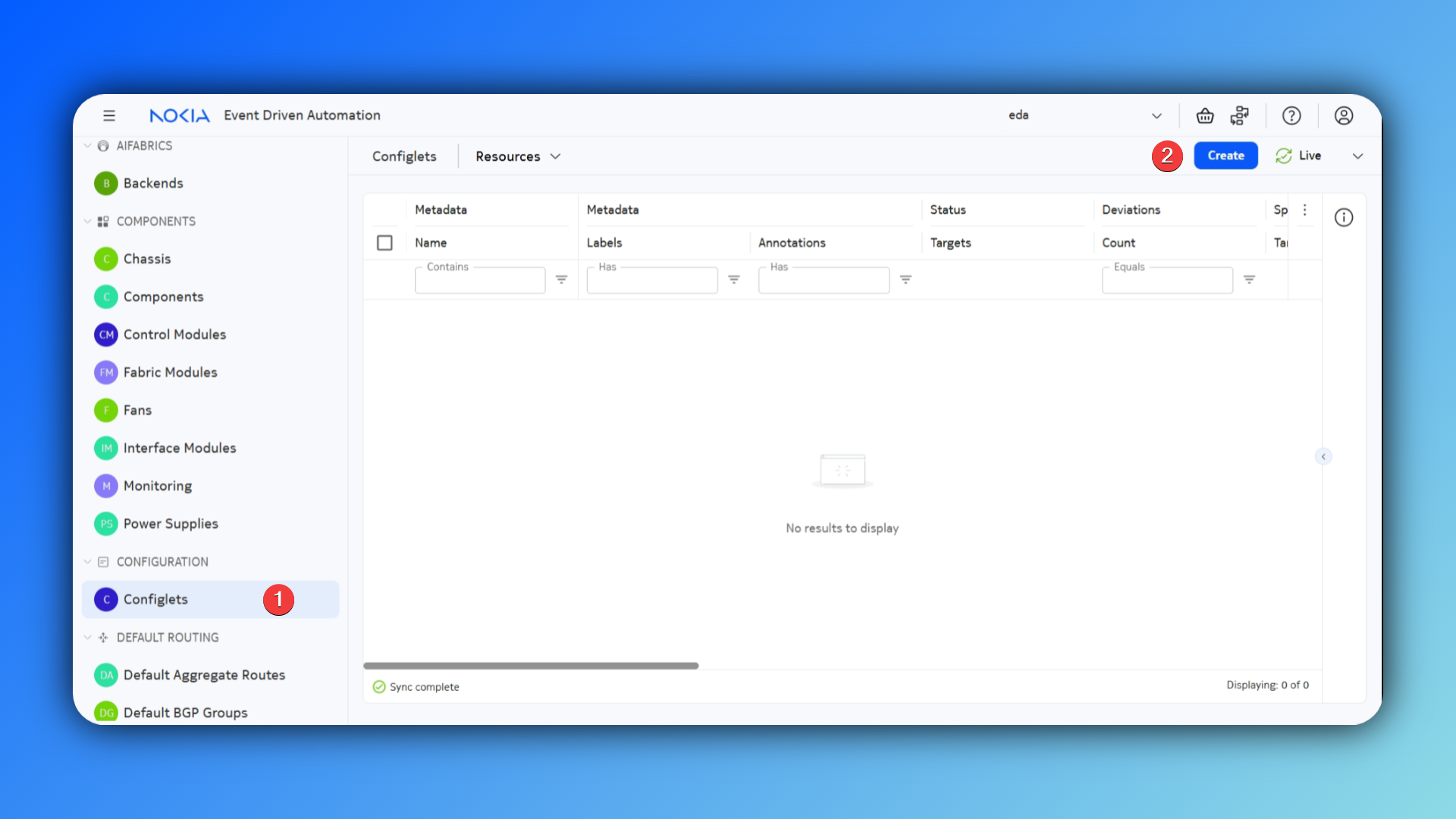
- Navigate to the Configlets resource and create a new resource
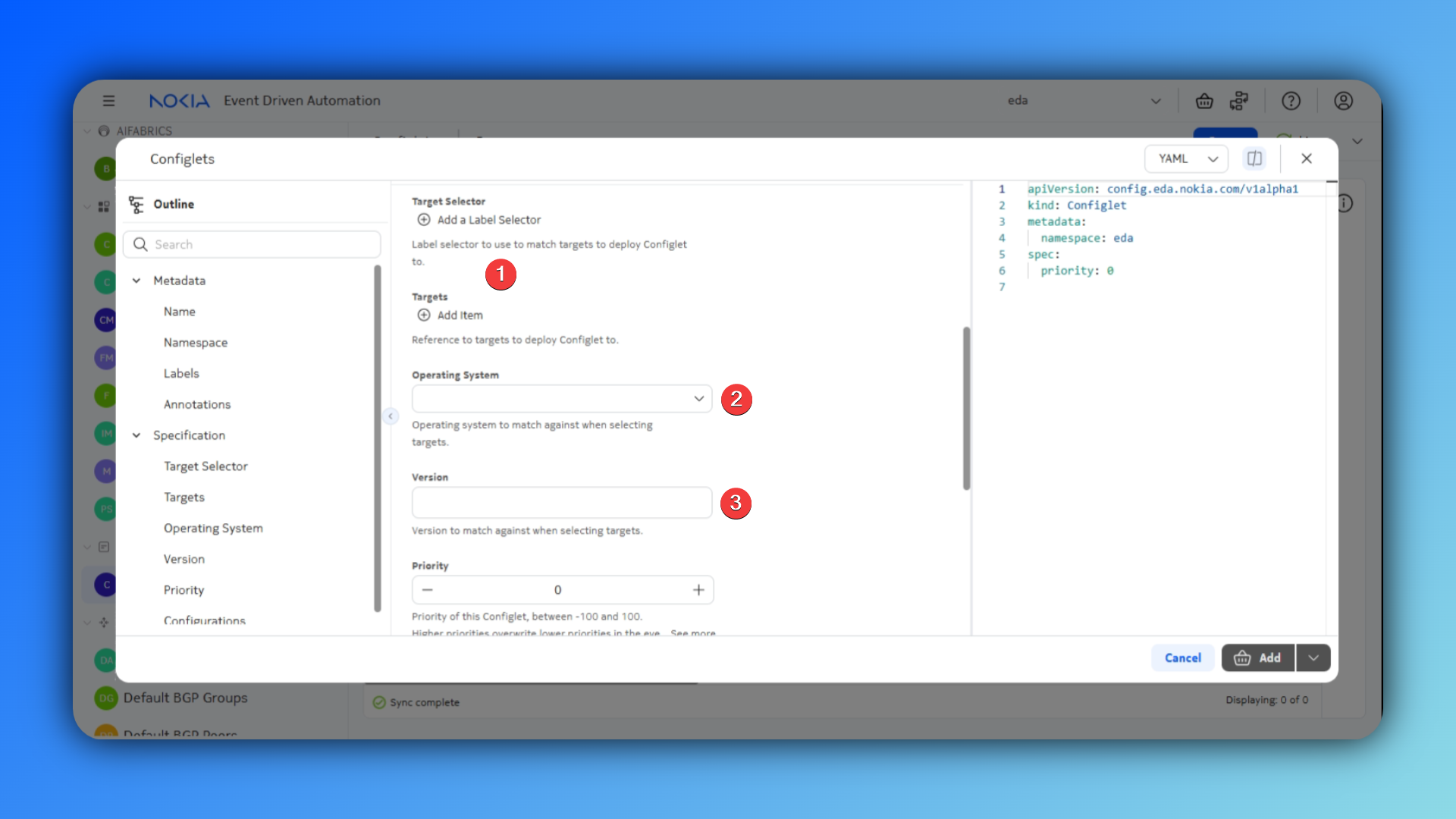
- Select your target nodes using a label or reference them directly. Specify the NOS and version.
- Specify your configlet details, this includes the
YANGpath injspathnotation, and the node configuration in JSON formatting.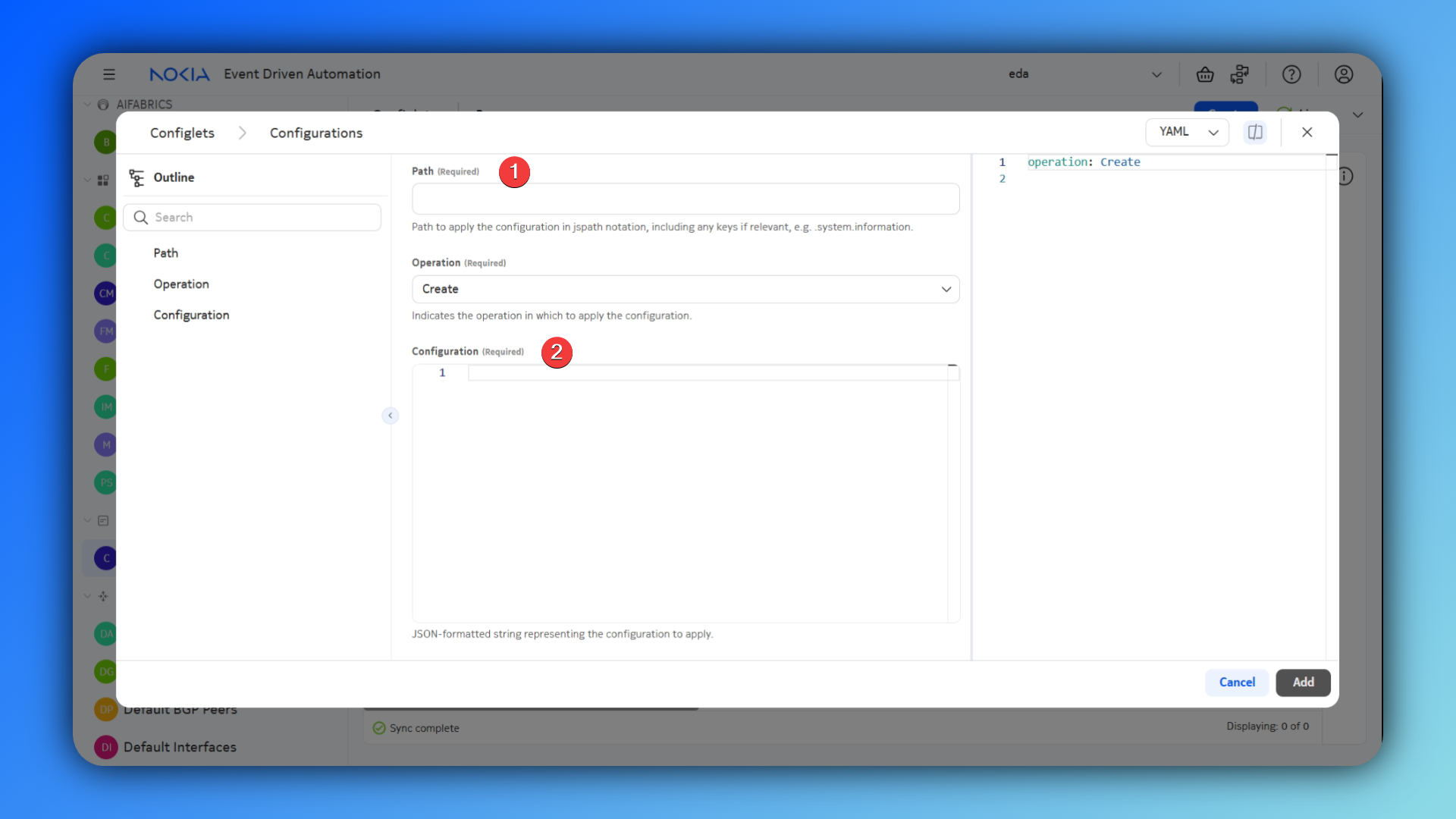
Hint
To easily retrieve the jspath and configuration, you can log into a node and push your required configuration. Next, you can use the command pwc jspath to retrieve the current working context in jspath format. Finally, you can retrieve the configuration in JSON format using the command info | as json
Solution
apiVersion: config.eda.nokia.com/v1alpha1
kind: Configlet
metadata:
  name: router-vrf1-evpn-link-bandwidth-advertise
  namespace: eda
spec:
  configs:
    - config: '{}'
      operation: Create
      path: >-
        .network-instance{.name=="router-vrf1"}.protocols.bgp-evpn.bgp-instance{.id==1}.routes.route-table.ip-prefix.evpn-link-bandwidth.advertise
  endpoints:
    - leaf1
    - leaf3
  operatingSystem: srl
  priority: 0
  version: 25.10.1
apiVersion: config.eda.nokia.com/v1alpha1
kind: Configlet
metadata:
  name: bgp-group-cnf-link-bandwith
  namespace: eda
spec:
  configs:
    - config: |
        {
          "link-bandwidth": {
            "add-next-hop-count-to-received-bgp-routes": 1
          }
        }
      operation: Create
      path: >-
        .network-instance{.name=="router-vrf1"}.protocols.bgp.group{.group-name=="bgp-group-cnf"}.afi-safi{.afi-safi-name=="ipv4-unicast"}.ipv4-unicast
  endpoints:
    - leaf1
    - leaf3
  operatingSystem: srl
  priority: 0
  version: 25.10.1
apiVersion: config.eda.nokia.com/v1alpha1
kind: Configlet
metadata:
  name: router-vrf1-enable-weighted-ecmp
  namespace: eda
spec:
  configs:
    - config: |-
        {
          "admin-state": "enable",
          "max-ecmp-hash-buckets-per-next-hop-group": 4
        }
      operation: Create
      path: >-
        .network-instance{.name=="router-vrf1"}.protocols.bgp-evpn.bgp-instance{.id==1}.routes.route-table.ip-prefix.evpn-link-bandwidth.weighted-ecmp
  endpoints:
    - borderleaf1
    - borderleaf2
  operatingSystem: srl
  priority: 0
  version: 25.10.1
1.3.4 Validate Weighted ECMP traffic load-balancing#
You can run traffic between client5 and the anycast service advertised by the CNFs using the script clab/configs/client/run-traffic.sh. This scripts takes the input of amount of seconds to run the traffic. This script will run 100 different iperf flows of 50kbps across the fabric to the 1.1.1.0/24 subnet.
$ bash clab/configs/client/run-traffic.sh 120
client1: 7d4e2829e2fc
client3: cfc6f672bb4d
client4: 15ab2fd79ff7
client5: 811ead78f872
iperf server already running in container 7d4e2829e2fc
iperf server already running in container cfc6f672bb4d
iperf server already running in container 15ab2fd79ff7
Starting iperf flows from client5...
# clipped
1.3.4.1 Grafana Dashboard#
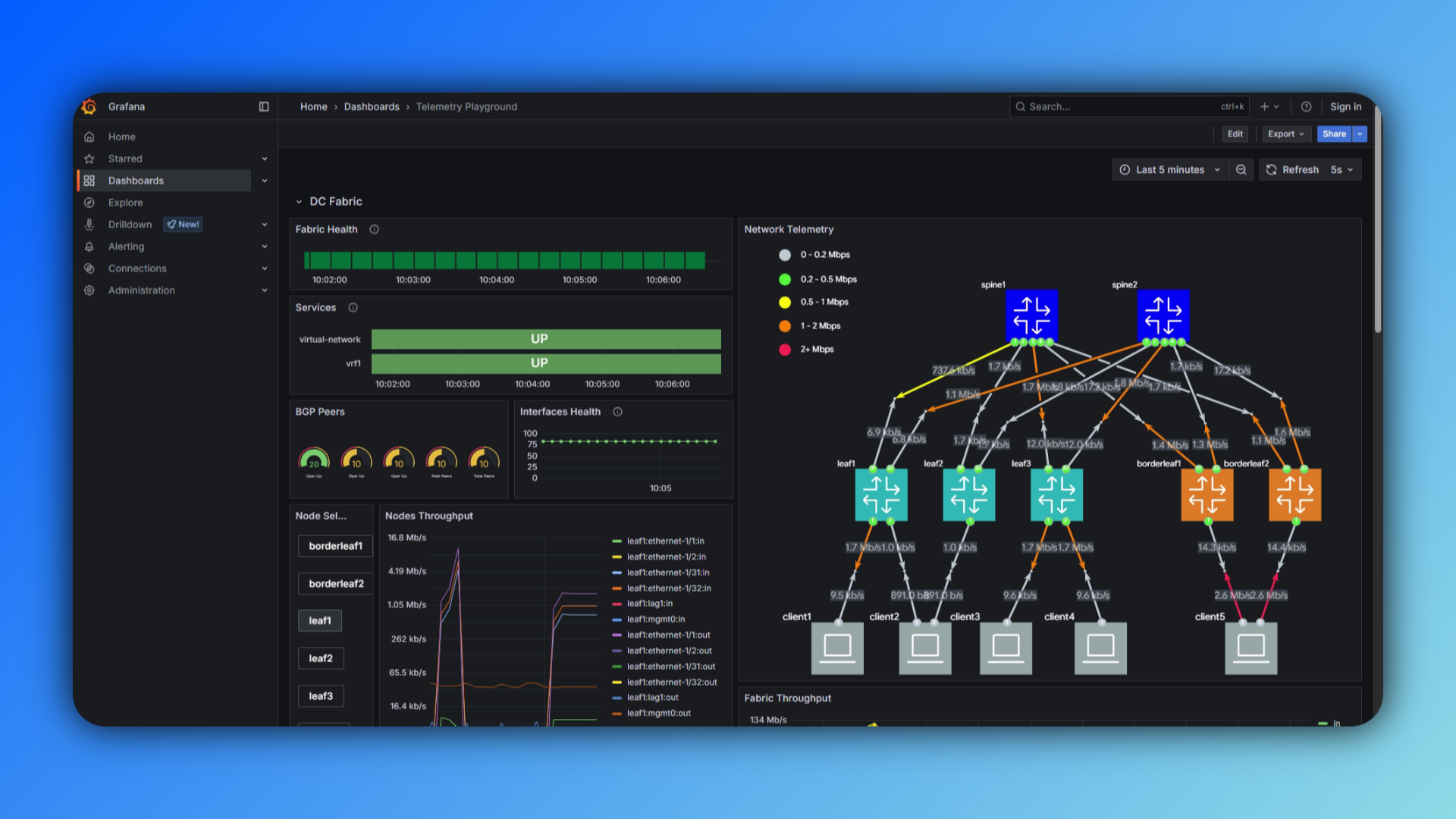
Navigate to https://{your-ip}:9443/core/httpproxy/v1/grafana/dashboard to see the live traffic distribution accross the fabric.
1.3.4.2 Custom EDA Dashboard#
1.4 Summary#
In this exercise, you successfully created a Virtual Network that enables layer-3 connectivity and PE-CE BGP sessions in a single abstracted intent. Specifically:
- You created a Virtual Network resource that defined multiple components in one declaration:
- A Router to create an IP-VRF for layer-3 routing
- Routed Interfaces to connect clients directly to the Router over specific VLANs
- BGP Peerings to manage edge connectivity
Next to this you enabled Weighted ECMP for EVPN IP prefix routes, to ensure an equal traffic distribution on the edge links.